Mastodon Skip to content
  • Home
  • Aktuell
  • Tags
  • Über dieses Forum
Einklappen
Grafik mit zwei überlappenden Sprechblasen, eine grün und eine lila.
Abspeckgeflüster – Forum für Menschen mit Gewicht(ung)

Kostenlos. Werbefrei. Menschlich. Dein Abnehmforum.

  1. Home
  2. Uncategorized
  3. Weird find: If you hit Ctrl+Shift+M on some #GNOME apps, it will give you a mobile preview of that app.
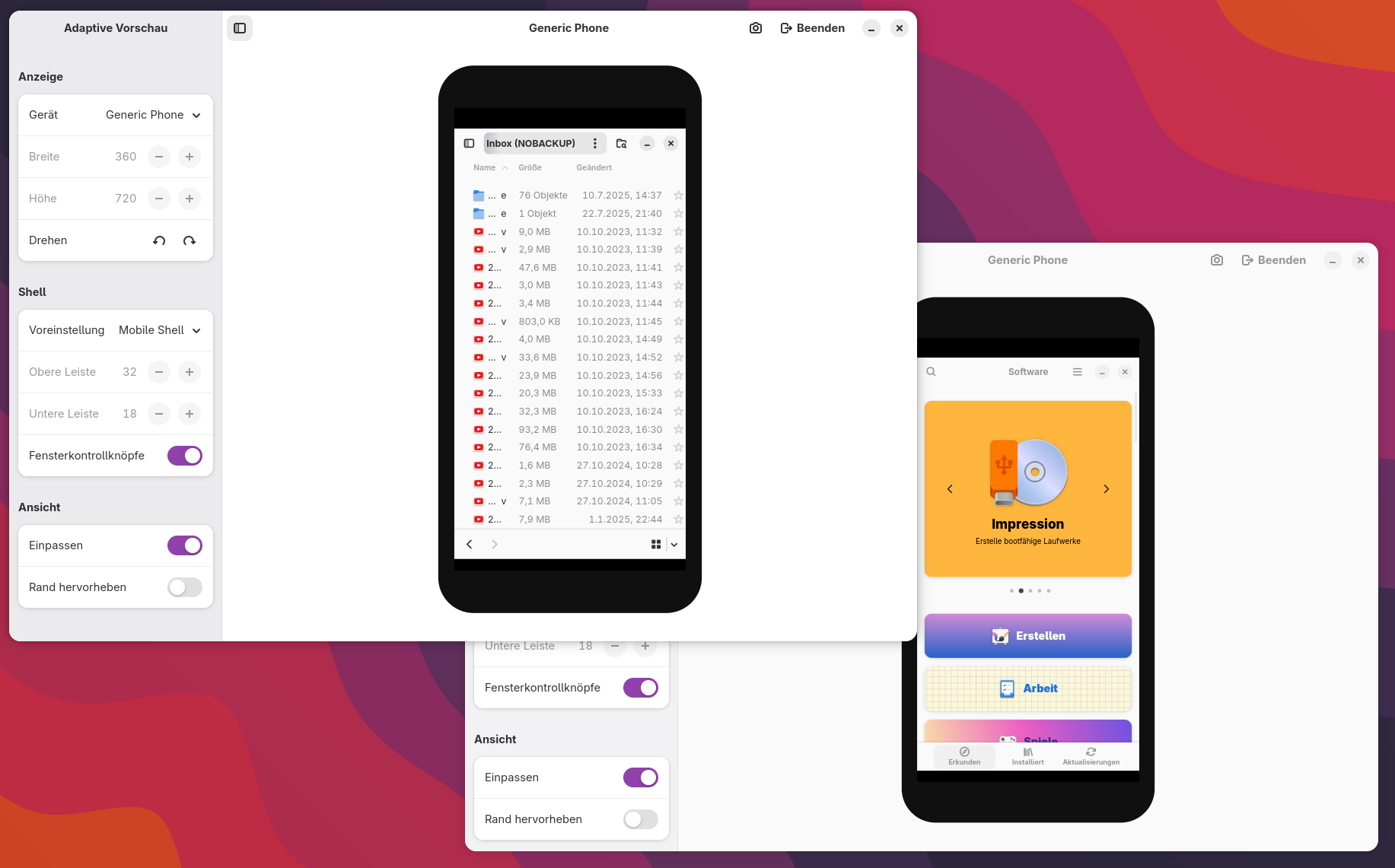
Weird find: If you hit Ctrl+Shift+M on some #GNOME apps, it will give you a mobile preview of that app.

Geplant Angeheftet Gesperrt Verschoben Uncategorized
gnome
5 Beiträge 5 Kommentatoren 1 Aufrufe
  • Älteste zuerst
  • Neuste zuerst
  • Meiste Stimmen
Antworten
  • In einem neuen Thema antworten
Anmelden zum Antworten
Dieses Thema wurde gelöscht. Nur Nutzer mit entsprechenden Rechten können es sehen.
  • claudius@darmstadt.socialC This user is from outside of this forum
    claudius@darmstadt.socialC This user is from outside of this forum
    claudius@darmstadt.social
    schrieb zuletzt editiert von
    #1

    Weird find: If you hit Ctrl+Shift+M on some #GNOME apps, it will give you a mobile preview of that app. Hitting the combo again (or clicking Exit at the top) will bring you back to normal dekstop view.

    Works in Calendar, Nautilus, Software, Weather, Settings, GEdit, Flatseal, Bottles and probably quite a few more.

    zoeythewitch@social.treehouse.systemsZ yuri@kitty.socialY mordoc@fosstodon.orgM sstendahl@floss.socialS 4 Antworten Letzte Antwort
    1
    0
    • claudius@darmstadt.socialC claudius@darmstadt.social

      Weird find: If you hit Ctrl+Shift+M on some #GNOME apps, it will give you a mobile preview of that app. Hitting the combo again (or clicking Exit at the top) will bring you back to normal dekstop view.

      Works in Calendar, Nautilus, Software, Weather, Settings, GEdit, Flatseal, Bottles and probably quite a few more.

      zoeythewitch@social.treehouse.systemsZ This user is from outside of this forum
      zoeythewitch@social.treehouse.systemsZ This user is from outside of this forum
      zoeythewitch@social.treehouse.systems
      schrieb zuletzt editiert von
      #2

      @claudius Yeah this has been a thing in libadw since GNOME 47 i think https://nyaa.place/blog/libadwaita-1-7/

      1 Antwort Letzte Antwort
      0
      • claudius@darmstadt.socialC claudius@darmstadt.social

        Weird find: If you hit Ctrl+Shift+M on some #GNOME apps, it will give you a mobile preview of that app. Hitting the combo again (or clicking Exit at the top) will bring you back to normal dekstop view.

        Works in Calendar, Nautilus, Software, Weather, Settings, GEdit, Flatseal, Bottles and probably quite a few more.

        yuri@kitty.socialY This user is from outside of this forum
        yuri@kitty.socialY This user is from outside of this forum
        yuri@kitty.social
        schrieb zuletzt editiert von
        #3

        @claudius@darmstadt.social Interesting, I'm currently working on something with libadwaita and it just works there too, without me adding this explicitly. It seems to just be a thing in the recent versions of libadwaita.

        1 Antwort Letzte Antwort
        0
        • claudius@darmstadt.socialC claudius@darmstadt.social

          Weird find: If you hit Ctrl+Shift+M on some #GNOME apps, it will give you a mobile preview of that app. Hitting the combo again (or clicking Exit at the top) will bring you back to normal dekstop view.

          Works in Calendar, Nautilus, Software, Weather, Settings, GEdit, Flatseal, Bottles and probably quite a few more.

          mordoc@fosstodon.orgM This user is from outside of this forum
          mordoc@fosstodon.orgM This user is from outside of this forum
          mordoc@fosstodon.org
          schrieb zuletzt editiert von
          #4

          @claudius #Tuba looks quite nice in a mobile form...

          1 Antwort Letzte Antwort
          0
          • claudius@darmstadt.socialC claudius@darmstadt.social

            Weird find: If you hit Ctrl+Shift+M on some #GNOME apps, it will give you a mobile preview of that app. Hitting the combo again (or clicking Exit at the top) will bring you back to normal dekstop view.

            Works in Calendar, Nautilus, Software, Weather, Settings, GEdit, Flatseal, Bottles and probably quite a few more.

            sstendahl@floss.socialS This user is from outside of this forum
            sstendahl@floss.socialS This user is from outside of this forum
            sstendahl@floss.social
            schrieb zuletzt editiert von
            #5

            @claudius It works on any GNOME app that has a modern enough version of Libadwaita. It's mainly meant as a development tool, so you can easily test how your application works on mobile interfaces.

            Honestly didn't know it was exposed for release builds though, for some reason I assumed it would be coupled to the `debug` flag for buildtype in meson. But it kinda makes sense it isnt, just never thought about it.

            1 Antwort Letzte Antwort
            0
            • alsternerd@akkoma.alster.spaceA alsternerd@akkoma.alster.space shared this topic

            Antworten
            • In einem neuen Thema antworten
            Anmelden zum Antworten
            • Älteste zuerst
            • Neuste zuerst
            • Meiste Stimmen


            Copyright (c) 2025 abSpecktrum (@abspecklog@fedimonster.de)

            Erstellt mit Schlaflosigkeit, Kaffee, Brokkoli & ♥

            Impressum | Datenschutzerklärung | Nutzungsbedingungen

            • Anmelden

            • Du hast noch kein Konto? Registrieren

            • Anmelden oder registrieren, um zu suchen
            • Erster Beitrag
              Letzter Beitrag
            0
            • Home
            • Aktuell
            • Tags
            • Über dieses Forum